Cover imagery & branding
A hero image, your logo, your brand colors, your hotel's voice. The proposal feels like your brochure, not a generic booking confirmation.
Stop emailing PDFs that go stale the moment a price changes. Build a proposal in HotelBee with cover imagery, multiple stay options and live pricing, then send a single link the guest can browse, compare, accept and pay on, on any device.
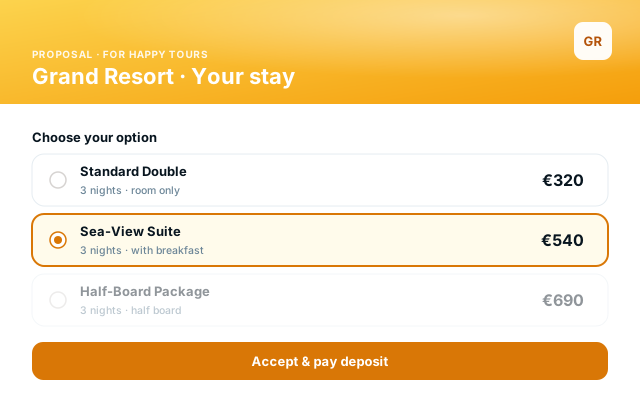
Proposals is a full quoting tool wired into the same calendar, inventory and rate plans as the PMS. Build a beautiful presentation, send it as a link, and let the guest sign and pay, no back-and-forth emails, no out-of-date PDFs.
A hero image, your logo, your brand colors, your hotel's voice. The proposal feels like your brochure, not a generic booking confirmation.
Offer Option 1 (Standard Double), Option 2 (Sea-View Suite), Option 3 (Half Board) on the same proposal. The guest sees them side by side and picks one.
One tap to accept an option. The selected option locks into the proposal, the others fade out, the proposal flips to "Accepted" automatically.
Tied into HotelBee Payments: the guest accepts the option, enters their card and pays the deposit (or the full amount) on the same screen.
One click to render the proposal as a print-ready PDF, with the same imagery and pricing as the web link. Useful for procurement teams or older inboxes that strip links.
Send the same proposal in English, Albanian, Italian, German — the guest sees it in their language. Your team writes once.
See when the guest opened the proposal, which option they viewed longest and the moment they accepted. No more guessing whether the email landed.
Send the proposal directly from the editor, email or WhatsApp link. The guest does not need an account, just the link.
The accepted option drops straight into the PMS calendar as a confirmed booking. The rate, dates and guest profile carry over with no re-entry.
Edit a proposal and re-send a new version on the same link. The guest always sees the latest pricing; old versions are kept in the audit trail.
Most quoting tools are generic. A hotel proposal is not a SaaS proposal: it has dates, room types, board options, group blocks, deposits and a brand the guest is paying to experience. The module is built around that reality.
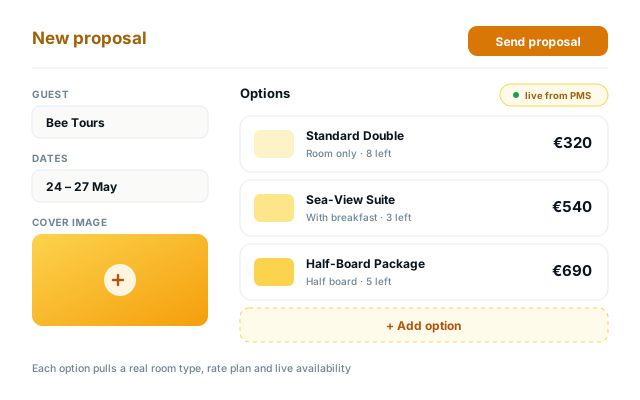
Open a new proposal, set the dates and the guest, then add as many options as you need. Each option pulls a real room type, real rate plan and live availability from the PMS, so the number you show is the number you can hold. Drop in hero imagery, intro copy and option-level descriptions; the result is a presentation, not a price list.
The proposal opens in any browser, on any device. The guest reads the intro, scrolls through the options, picks one, and is taken straight into accept-and-pay. The whole flow lives on the same URL, so a forwarded link or a re-opened email keeps working. When they accept, the proposal updates in real time on your side too — you see the green badge appear.
The moment a guest accepts, the selected option drops into the PMS calendar as a confirmed booking, the deposit posts to the folio, and your team gets a notification. No copy-paste from a PDF, no manual reservation entry, no risk of an option being double-sold. The full proposal — pricing, attachments, signed acceptance — is kept on the reservation's file for audit.
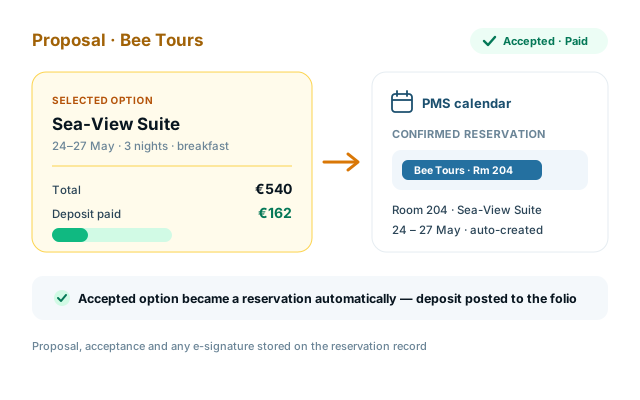
Proposals is not a side tool. It reads the same inventory the PMS reads, charges the same payment rails the front desk uses and writes back to the same calendar.
We used to build group proposals in PowerPoint, export PDFs and email them. Half the time the rate changed before the client even opened the file. Now we send a HotelBee link, the client picks an option, signs and pays the deposit in one go, and the booking is already in the calendar by the time I open my laptop the next morning.
A proposal touches the calendar, the folio and the contract. The modules below close every part of the loop without ever leaving the system.
Both. The default delivery is a web link the guest opens in any browser, where they can read, compare options, accept and pay. You can also export the same proposal as a print-ready PDF, useful for procurement teams or older inboxes that strip links. The web link is always the source of truth — if you edit the proposal, the link updates immediately.
Yes. A proposal can hold as many options as you need — Option 1 (Standard Double), Option 2 (Sea-View Suite), Option 3 (Half Board package) — each with its own pricing, dates, photos and description. The guest sees them side by side, picks one, and the others fade out. The accepted option is what converts into a reservation.
The accepted option drops into the PMS calendar as a confirmed reservation in real time. If you have HotelBee Payments and the guest paid a deposit, the payment posts to the folio automatically. If you also attached a document for e-signature, the signed copy is stored on the reservation's file. Your team gets a notification; nothing manual.
Yes, when HotelBee Payments is enabled. After they accept an option, the guest is taken straight into a pay screen on the same URL, where they enter their card and pay the deposit or full amount. The payment posts to the folio, the proposal flips to "Paid", and the reservation is confirmed.
No. The proposal is a public link, opened in any browser. The guest reads, accepts and pays without ever creating an account or installing an app. The link is unguessable; you can also expire it after a set date or revoke it from the editor.
Yes. Proposals support multi-language delivery: you write the proposal in your working language and translations are applied at send time, so the guest sees it in theirs (English, Albanian, Italian, German — others available). Your team only maintains one version.
Yes. The proposal record shows Sent → Viewed → Accepted → Paid in real time, with a timestamp on each event. You can see which option the guest spent the most time on, whether they re-opened it, and when they finally accepted. No more guessing whether the email landed.
Free plan available. No credit card required. Most properties send their first live proposal within an hour of turning the module on.