Touch / mouse / pen capture
The guest signs with a finger on the iPad, a stylus on a tablet, a mouse on a laptop. The signature is rendered as a vector and embedded on the document in the right field.
Stop printing, stop scanning, stop chasing missed signatures. HotelBee captures the guest's signature directly on any device — touch screen, mouse, or stylus — embeds it on the document, and files the signed copy on the reservation with a full audit trail.
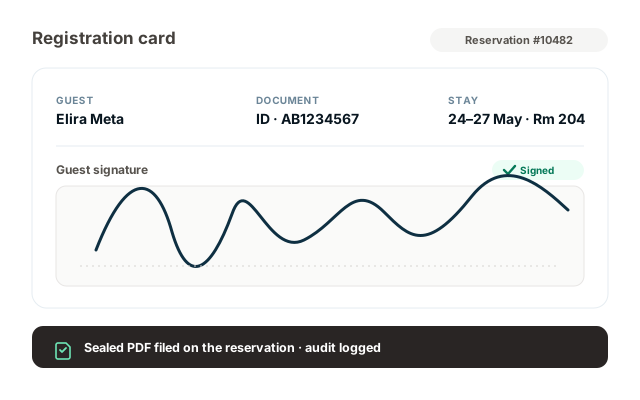
E-signatures is not a bolted-on tool. It sits inside the documents you already produce — the registration card the PMS prints at check-in, the invoice the folio generates, the proposal sent by sales, the GDPR consent at first contact. Capture the signature once; the signed PDF and the audit log are filed for you.
The guest signs with a finger on the iPad, a stylus on a tablet, a mouse on a laptop. The signature is rendered as a vector and embedded on the document in the right field.
iPad at the front desk, the guest's own phone via WhatsApp link, a laptop in the back office. The signing flow adapts to the screen and never requires an app install.
Registration cards, invoices, folios, proposals, contracts, GDPR consent forms. The signature field is in the right place; you don't rebuild the document.
Hand the iPad to the guest at check-in, or send a one-click link before they arrive. Either way, the signed copy lands in the same place.
The registration card and consent prompts render in the guest's language — English, Albanian, Italian, German — without a separate template per language.
Need both spouses on the registration card, or the bride and groom on the wedding contract? Send a single envelope that routes through each signer in order, and only counts as complete when everyone signs.
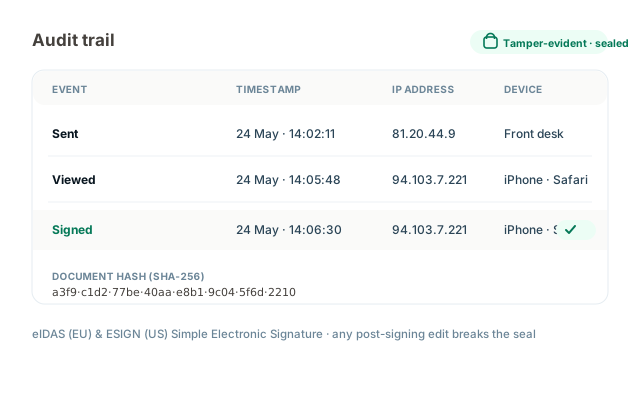
Every signed PDF is sealed with a SHA-256 integrity hash. Any change after signing breaks the seal and the document is flagged as tampered.
Captured signatures qualify as Simple Electronic Signatures (SES) under EU eIDAS and the US ESIGN Act, with the audit trail to evidence intent, consent and signer identity.
Every signed document is automatically attached to the guest's reservation in the PMS. No "where did we save the registration card" — it is on the booking, with the timestamp.
The guest receives a copy of the signed document via email or WhatsApp the moment they finish signing — useful for invoices, contracts and GDPR consent.
E-signature SaaS exists. Most of it is built for legal teams, with templates, envelopes and signers who care about doc IDs. A hotel needs the signature on the registration card the PMS just printed, on the iPad in front of the guest, in fifteen seconds. The module is built for that.
The receptionist opens the reservation, taps "Registration card", hands the iPad to the guest. The guest reviews the prefilled fields (name, ID, address — already on file from the booking), signs with a finger, taps Done. The signed PDF is filed on the reservation, the key is cut, the guest is in their room. No printing, no scanning, no folder of paper to file at the end of the shift.
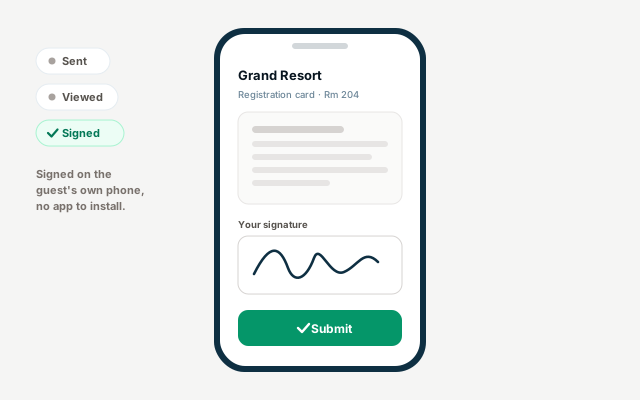
For online check-in or remote contract signing, send a one-click link by email or WhatsApp. The guest opens it on their phone, reviews the document, signs and submits. The signed copy is filed on the reservation; the front desk sees a green badge appear on the booking and the guest can skip the desk on arrival entirely.
Legally-binding electronic signatures — compliant with the US ESIGN Act and the EU eIDAS regulation (Simple Electronic Signature). Every signature is captured with a full audit trail: signer identity, timestamp, IP address, device, the consent statement accepted (with version), and a SHA-256 integrity seal that detects any later change to the signed document.
E-signatures is not a separate envelope tool you have to learn. It is a signature field on the documents you already send — registration cards, invoices, contracts, proposals, GDPR consent — captured and filed in the same flow.
We were still printing registration cards, stapling the ID copy, scanning them at night and saving them to a folder by date. Half of them went missing. Now the iPad goes across the desk, the guest signs in five seconds, and the card is on the reservation before they've finished asking for the Wi-Fi password.
Every paper document HotelBee replaces unlocks a faster, more compliant flow somewhere else. The modules below are the natural places signatures end up.
Yes, for the vast majority of hotel use cases. HotelBee captures what eIDAS (EU) calls a Simple Electronic Signature (SES) and ESIGN (US) recognises as an electronic signature: a signature mark together with evidence of the signer's intent and consent, captured with a full audit trail (timestamp, IP, device, document hash, prompts shown). This is the standard accepted for registration cards, invoices, hotel contracts, T&Cs and GDPR consent. For higher-assurance signatures (Qualified Electronic Signatures under eIDAS), we can route through a qualified trust service — talk to us about your specific requirement.
No. In-person, the guest signs on your iPad with their finger; nothing to install. Remotely, the guest clicks a link on their phone, signs in a browser, and submits. They never create an account. The link is unguessable and can be expired.
Yes. The signature pad accepts touch (finger), stylus (Apple Pencil, S Pen, any active or passive stylus) and mouse input. The signature is captured as a vector at full resolution and embedded on the document at print quality.
On the guest's reservation in the PMS, with a copy in the document audit log. The signed PDF is sealed with a SHA-256 integrity hash, so any change after signing breaks the seal and the document is flagged as tampered. You can download or re-send a copy at any time.
Yes. Send a single envelope that routes through each signer in order, or in parallel. The document only counts as complete when every signer has signed; the audit log records each signer independently. Common for registration cards with two adults, wedding contracts and corporate event agreements.
Anything HotelBee produces or anything you upload: registration cards, invoices, folios, proposals, event contracts, T&Cs, GDPR consent, gift voucher terms, membership agreements. The PMS-produced documents come with the signature field pre-placed; uploaded PDFs let you drop signature fields wherever you need them.
Yes. Registration cards, consent prompts and the signing UI render in the guest's preferred language — English, Albanian, Italian, German, and others — without a separate template per language. The signed PDF retains the language the guest signed in, for the audit record.
Free plan available. No credit card required. Most front desks switch to digital registration cards on the first afternoon they turn the module on.