Every bottle, every plate, every room, accounted for.
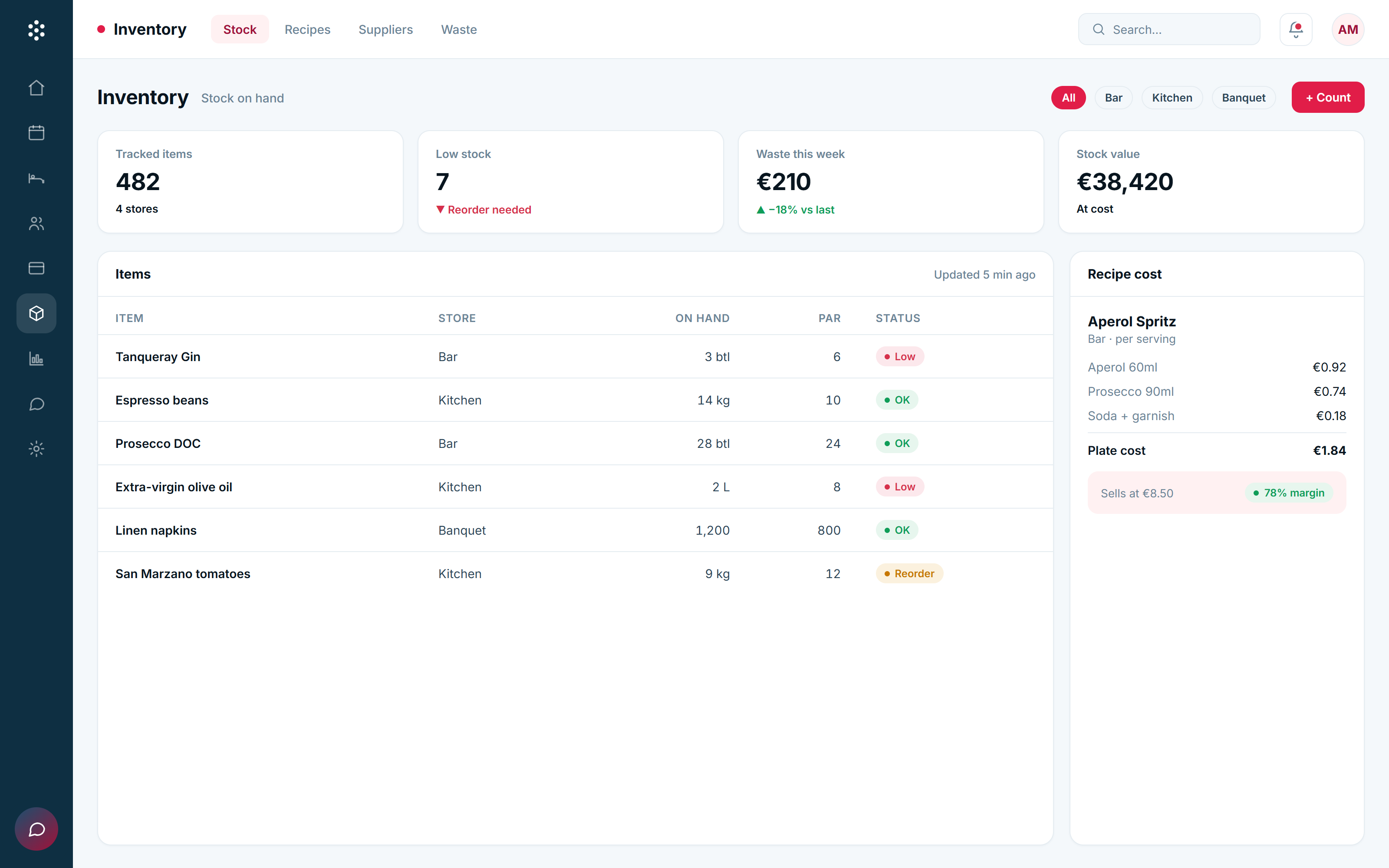
POS sales deduct their ingredients by recipe the moment an order is placed. Deliveries, transfers, write-offs and counts are all recorded, so you can see stock, cost and margin for any warehouse on any date.
Powering 80+ outlets · Live stock movements · 4.6 / 5 on G2
app.hotelbee.co/pos/inventory
Inventorylive stock
Tanqueray GinBarReorder placed
Espresso beansKitchen
Prosecco DOCBar
Olive oilKitchen
LiveStock moves as orders are placed
15Stock and cost reports
1 per roomWarehouse for every guest room
Inside the module
Every delivery, every sale, every count, on the record.
Stock in HotelBee is never typed over. Every movement is a document, a sold cocktail, a delivered case, a wasted portion, a counted shelf, and the balance of any product in any warehouse is worked out from them, for today or for any date in the past.
Recipes that deduct stock
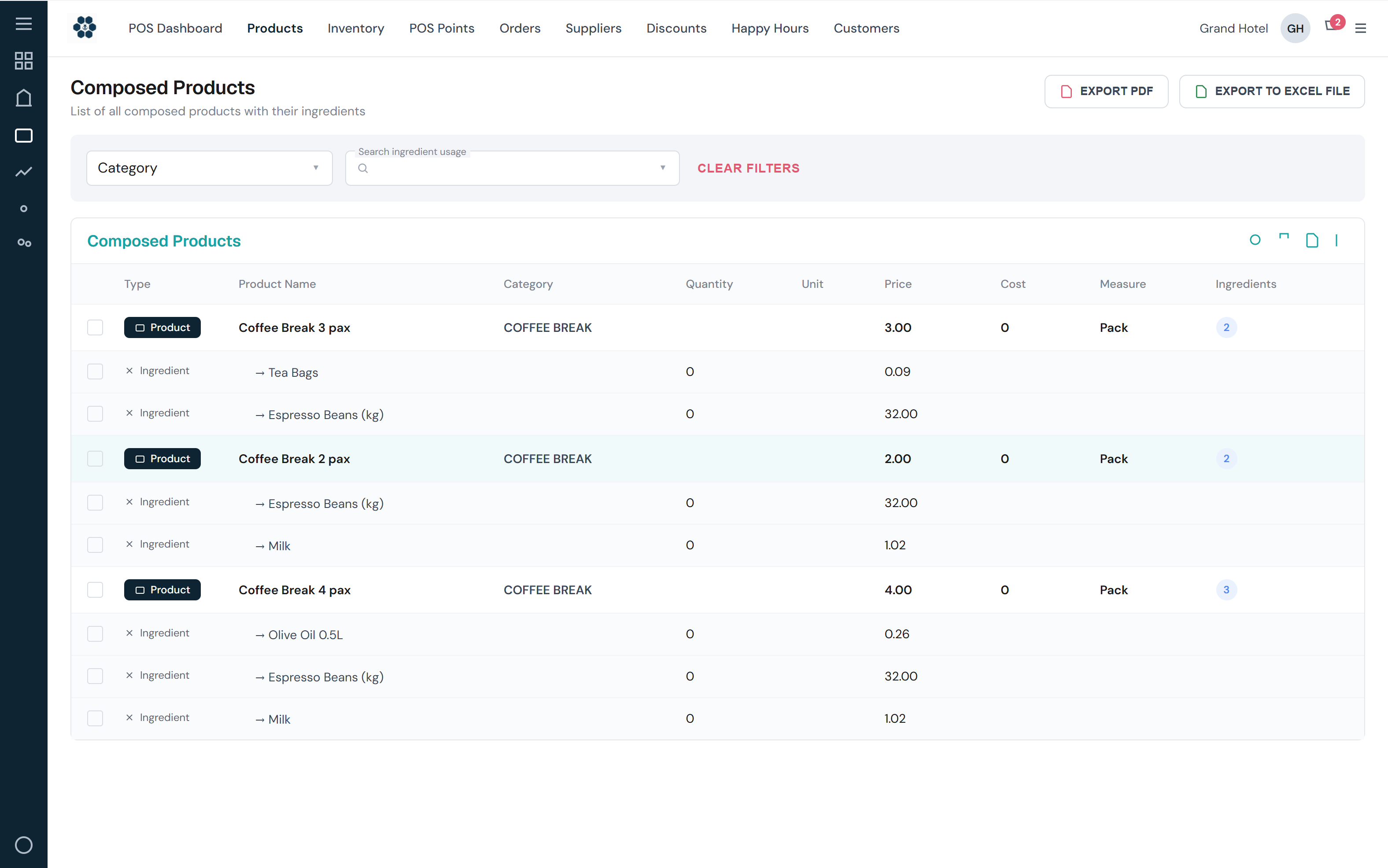
Composed products and sub-recipes expand into ingredients when the POS, the online menu or an event menu sells them, with deduction factors and modifiers applied. A recipe cost card shows the plate cost from current ingredient costs.
Purchase orders & supplier bills
Draft, order, deliver. Prices with VAT, discounts and any currency, a supplier bill linked to the delivery, and an Excel import that creates one purchase order per supplier.
Stores, outlets and rooms
A main store, a bar, a kitchen, each with its own stock and transfers between them. Turn on room inventory and every guest room gets its own warehouse for linens, towels and equipment.
Counts & corrections
Count a warehouse on screen or import the count from Excel. HotelBee records the difference against the stock at the moment you save, dated to when the count was done.
Write-offs with a reason
Record waste, expired stock, staff meals, comps and sales from another till. A composed item written off as a whole is expanded into its ingredients when you confirm.
Reorder, expiry & price alerts
Min and par levels per store, daily low-stock and expiry digests, and an alert when a supplier raises a price by more than your threshold.
Take a closer look
Built around how hotels actually use stock.
A hotel does not have one stockroom. It has a main store, a bar, a kitchen, an event hall and a hundred guest rooms. HotelBee tracks each one, moves stock between them, and tells you what each sale really cost.
Recipes drive stock
Sell a cocktail and the gin leaves the bar.
Any menu item can be a composed product with a recipe, and recipes can contain other recipes. When an order is placed at the POS, through the online menu or as part of an event menu, HotelBee expands it into ingredients and deducts them from the warehouse that serves that POS point. Voids and cancellations put the stock back. Online-menu orders only take stock once staff accept them.
Sub-recipes for sauces, bases and mixes
Recipe cost card with the current plate cost
Each sale keeps the cost of the ingredients it used
app.hotelbee.co/pos/products
Costing & margins
Know what each plate costs, and where the margin went.
Choose standard cost or moving weighted average. With weighted average, every delivery updates a product’s cost net of VAT and discounts, and every sale, write-off and transfer is valued at that cost. Cost of Sales compares revenue with cost per POS point and ranks menu items by margin. Usage Variance compares what left the shelves with what the recipes explain, takes out recorded write-offs, and shows the loss nobody recorded.
Weighted average or standard cost, chosen per property
Cost of Sales with menu-engineering classes
Usage Variance: actual against theoretical, minus write-offs
Supplier price history with price-increase alerts
app.hotelbee.co/reports
Stores, outlets, rooms
From the main store to the bar to room 204.
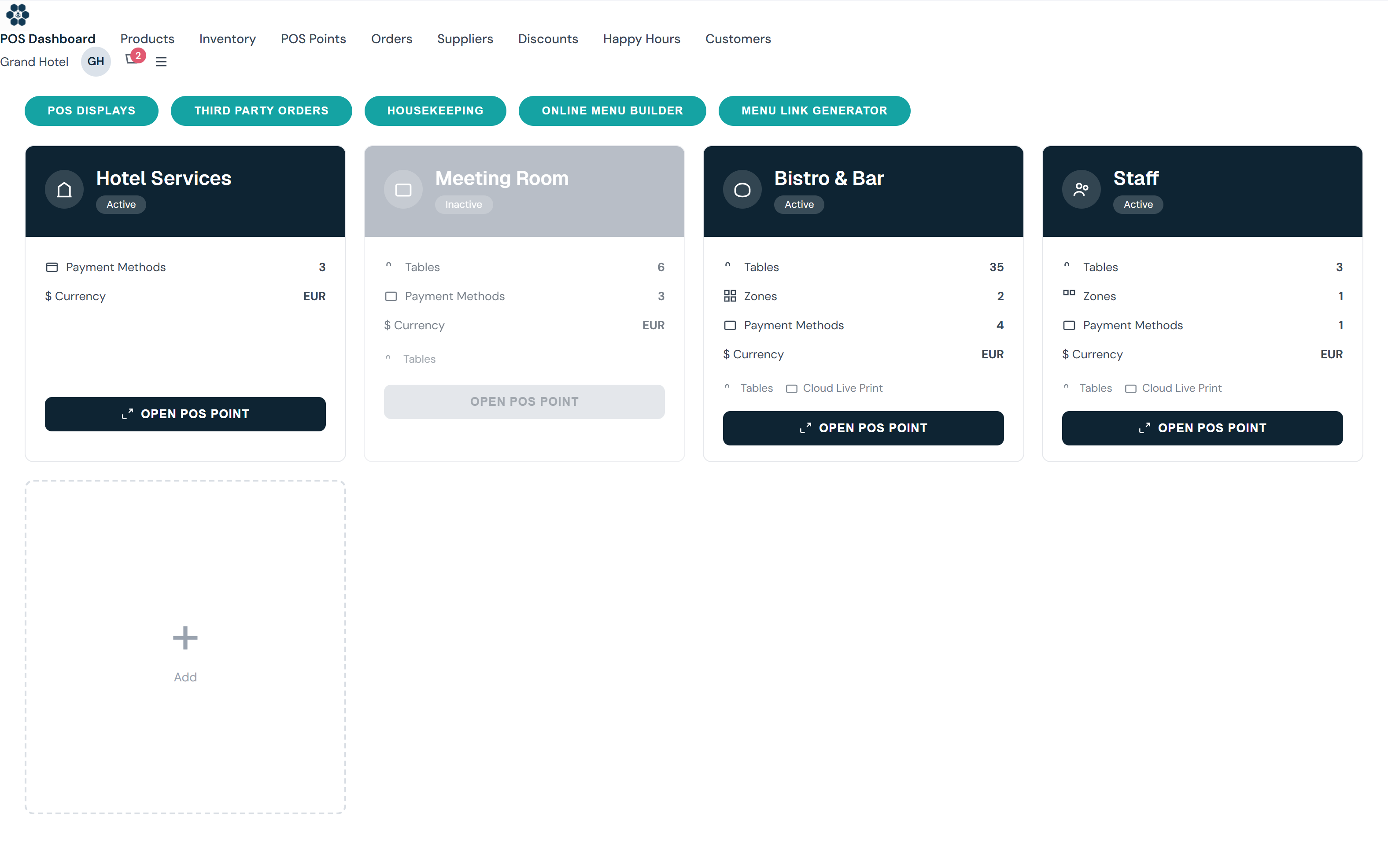
Each POS point sells from its own warehouses. Transfers move stock from the main store to the outlets, and the Reorder report drafts purchase orders per supplier, or a replenishment transfer for an outlet, from the min and par levels you set. With room inventory on, every room has its own warehouse: set a standard per room type, restock rooms in one step and count a room to see what is missing.
Min and par levels per store, a default supplier per product
Draft purchase orders per supplier and store in one click
Room standards per room type, one-step restock, room counts
Negative stock rule: allow, warn or block on transfers and write-offs
app.hotelbee.co/pos/pospoints
Works with
Connected to every place you sell.
Inventory reads every sale HotelBee makes, from the restaurant till to the event hall, and every delivery turns into a supplier bill your accountant can work from.
We thought we had a 28% food cost. After two months on HotelBee inventory it turned out we were running 34%, and the variance reports showed exactly why. Tightening up portions and supplier prices brought it back to 26% within a quarter.
SM
Sokol MarkuF&B Manager · Vila Panorama, Sarandë
Better together
Pairs naturally with the rest of HotelBee.
Inventory does not live alone. It sits between the outlets that use the stock and the reports that explain it. The modules below close the loop.
Yes. A menu item with a recipe is expanded into its ingredients, including sub-recipes, deduction factors and modifiers, the moment the order is placed at the POS. Event menus and accepted online-menu orders work the same way. Voids and cancellations put the stock back. A recipe change applies to future sales.
Can I run several stores and outlets?
Yes. Create a warehouse for every place you count, a main store, a bar, a kitchen, and link each POS point to its warehouses. Sales deduct from the right one, transfers move stock between them, and every report can be filtered by warehouse.
How do stock counts work?
Open Adjust inventory for a warehouse and enter what you counted, or import the count from an Excel sheet. HotelBee compares it with the system stock at the moment you save and records the difference, dated to when the count was done. Rooms are counted from the room inventory screen.
Standard cost or weighted average, which should I use?
Standard uses the cost you enter on each product, which is simple and predictable. Weighted average recalculates each product’s cost from its deliveries, net of VAT and discounts, so stock value and cost of sales follow what you actually paid. You choose per property in the general settings.
Can it track expiry dates?
Yes, for the products you choose. Add an expiry date on the purchase line when goods arrive. HotelBee works out which batches are still on the shelf, sends a daily alert a set number of days before they expire (7 by default), and the expiry report writes off expired stock in one step. It never blocks a sale.
Can I track what is in the guest rooms?
Yes. Turn on room inventory and every room gets its own warehouse. Mark furniture, linens and electronics as assets, set a standard list per room type, restock rooms in one step and count a room to see what is missing or extra. Assets never appear in the POS or the online menu.
Which reports are included?
Products inventory now, Stock Summary, Inventory Valuation, Product Movement, Inventory Report, Inventory Adjust, Inventory Cost, Cost of Sales, Usage Variance, Supplier Price History, Purchase & Supply, Stock Write-off, Void / Waste, Reorder and Product Expiry. Most reports export to Excel.
How does it connect to accounting?
Every delivery can create a supplier bill, and supplier balances, payments and bulk payments live in the Suppliers module. Inventory, valuation and cost reports export to Excel for your accountant.
Ready when you are
Tighten margins without tightening the screws.
Free plan available. No credit card required. Build your first recipe in under ten minutes.